How to register on sexchat24.com
Creating your account takes about 5 minutes. After you upload your ID, your account is activated within 6 hours, usually within a few hours.
Before you start
- Your valid ID card or passport
- A phone or camera to take a selfie of you holding your ID
- An email address you only use for this work
- A username (stage name) that is not connected to your real name
- Your payout details: a bank account (IBAN and BIC/SWIFT), or a YourSafe or Paxum account
Open the sign-up page
Go to sexchat24.com/register.
Fill in the sign-up form
- Select Camgirl - model as the account type. The other options are for viewers and agencies.
- Choose your Username. Viewers will see this name, so do not use your real name.
- Enter your E-mail, then your Password twice.
- Type the letters from the picture into Enter the image code. If you cannot read them, click the picture to get a new code.
- Tick I agree to the rules governing use, then click Sign up.
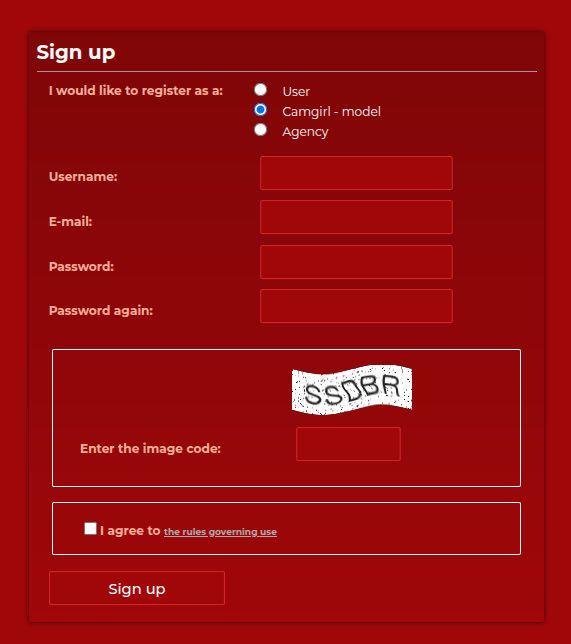
The sign-up form with Camgirl - model selected Find your way around your account page
After signing up you land on the User data page. At the top you see your username, your credit balance, how long you have been a member and your email address. You can change your password here at any time.
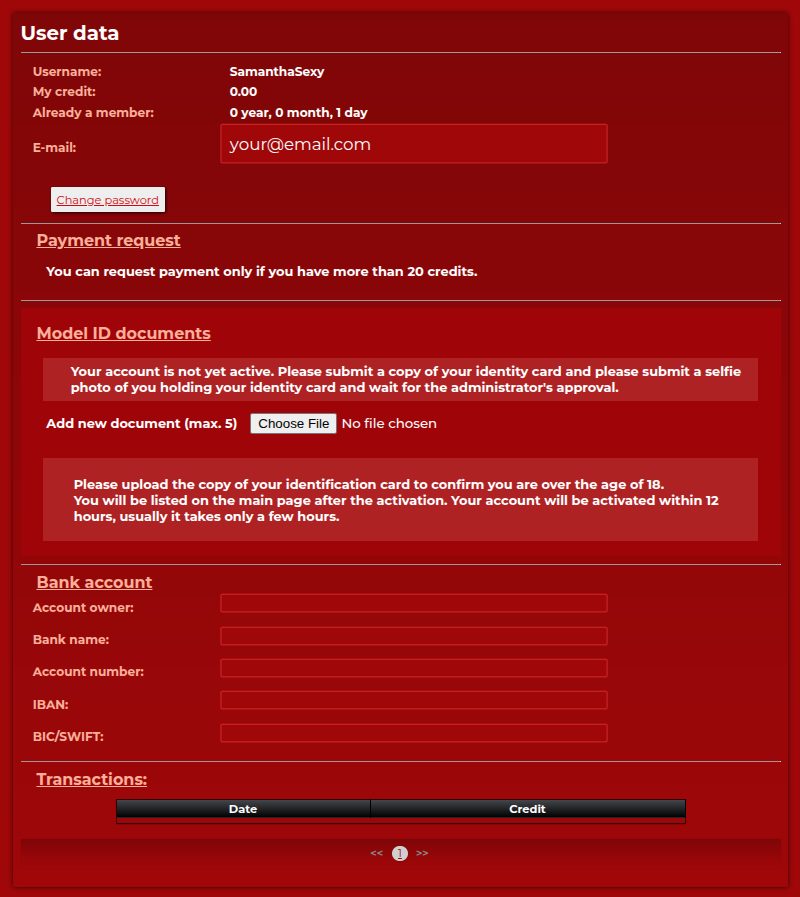
The User data page: account details, ID upload and bank account Upload your ID documents
In the Model ID documents section, use Choose File to upload one of these sets (up to 5 files):
- The front and back of your ID card, plus a selfie of you holding the ID card, or
- The photo page of your passport, plus a selfie of you holding the passport.
Make sure the photos are sharp, the whole document is visible and your face and the ID photo can be compared easily. Your documents are only used to confirm that you are over 18 and are never shown to viewers.
Sign your model agreement
After your documents are checked, we send your model agreement to your email. In short, you confirm that:
- you agree to appear in your broadcasts and that they may be shown publicly on the website,
- you only broadcast legal content that follows the site rules,
- everyone who appears on your camera is over 18 and has agreed to appear,
- you only use content you own, and you do not let anyone else use your account.
Read it in full before signing, and ask our support if anything is unclear.
Add your bank account
Further down the User data page, fill in the Bank account fields: account owner, bank name, account number, IBAN and BIC/SWIFT. The account must be in your own name. If you prefer YourSafe or Paxum, use the same fields like this:
Payout method Bank name Account number IBAN Bank Your bank’s name Your account number Your IBAN Paxum Paxum Your Paxum email address Leave empty YourSafe YourSafe Leave empty Your YourSafe IBAN You can request a payout once your balance is over 20 credits (€20), and we transfer it within 48 hours. We also pay out automatically once a month if your balance is over 20 credits. Your balance already shows your 50% share.
Wait for activation
Your account is activated within 6 hours, usually within a few hours. After activation you appear on the main page and can start broadcasting.
Start your registration
Free, with no obligation until you sign the model agreement.